
The Exit Intent trigger is a powerful engagement tool available in Simply Popups Pro. It detects when a visitor is about to leave your website and displays a popup at that critical moment. This is widely used for “last chance” offers, cart abandonment recovery, and newsletter signups.
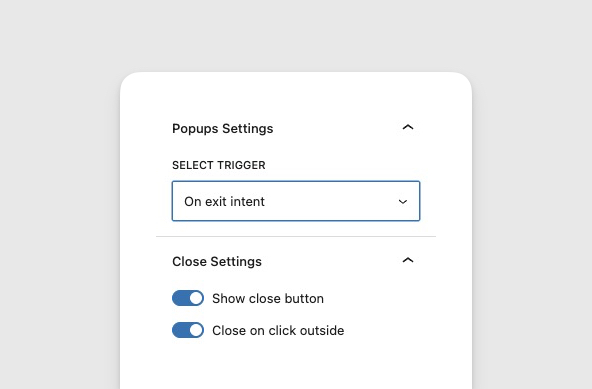
How Exit Intent Works
Simply Popups monitors the visitor’s mouse cursor movement on desktop devices.
- Detection: When the cursor moves quickly towards the top of the browser window (where the address bar, tabs, and close button are located), the plugin interprets this as an intent to leave.
- Trigger: The popup opens immediately, interrupting the exit process with your offer or message.
- Frequency: To avoid annoying users, the exit intent popup triggers once per page load. If a user closes it and tries to leave again, it will not reappear until the page is refreshed.
Setting Up an Exit Intent Popup
- Ensure you have Simply Popups Pro installed and activated.
- Select the parent Simply Popups block in the editor.
- In the sidebar settings, locate the Trigger Type dropdown.
- Select Exit Intent.
Since you cannot simulate “leaving” the editor, you must preview the page or view the live site to test this trigger.
Mobile Behavior
Exit intent relies on cursor tracking, which isn’t possible on touch devices (mobiles and tablets).
- Desktop: Uses cursor tracking (highly accurate).
- Mobile: The Exit Intent trigger may not fire on mobile devices, or may fallback to a timer (depending on configuration).
Recommendation: If mobile traffic is critical, consider using the Delayed Trigger or Scroll Trigger instead for those devices.
Best Practices for Exit Intent
1. Make it Worth It
The user is already leaving. Your offer needs to be compelling enough to change their mind.
- “Wait! Get 10% off if you complete your order now.”
- “Don’t miss our weekly tips – sign up before you go.”
2. Keep it Simple
Use minimal text and a clear call-to-action (button). Complicated forms or long paragraphs will be ignored by a departing user.
3. Don’t Be Aggressive
Since this interrupts the user’s action, ensure the close button is clearly visible. Making it hard to close the popup will create a negative impression of your brand.